Guides/005
Drone Lab Inventory System
deployedA QR-based checkout platform that gave a drone lab full accountability for every asset it owns
- logged
- 2026.07
- timeframe
- 2026
- role
- Solo build — SAFCSP Drone Lab
- stack
- fastapipostgresqlreact 19vitedockerghcr + watchtowerqr/barcode scanning
- source
- —
Why I built it
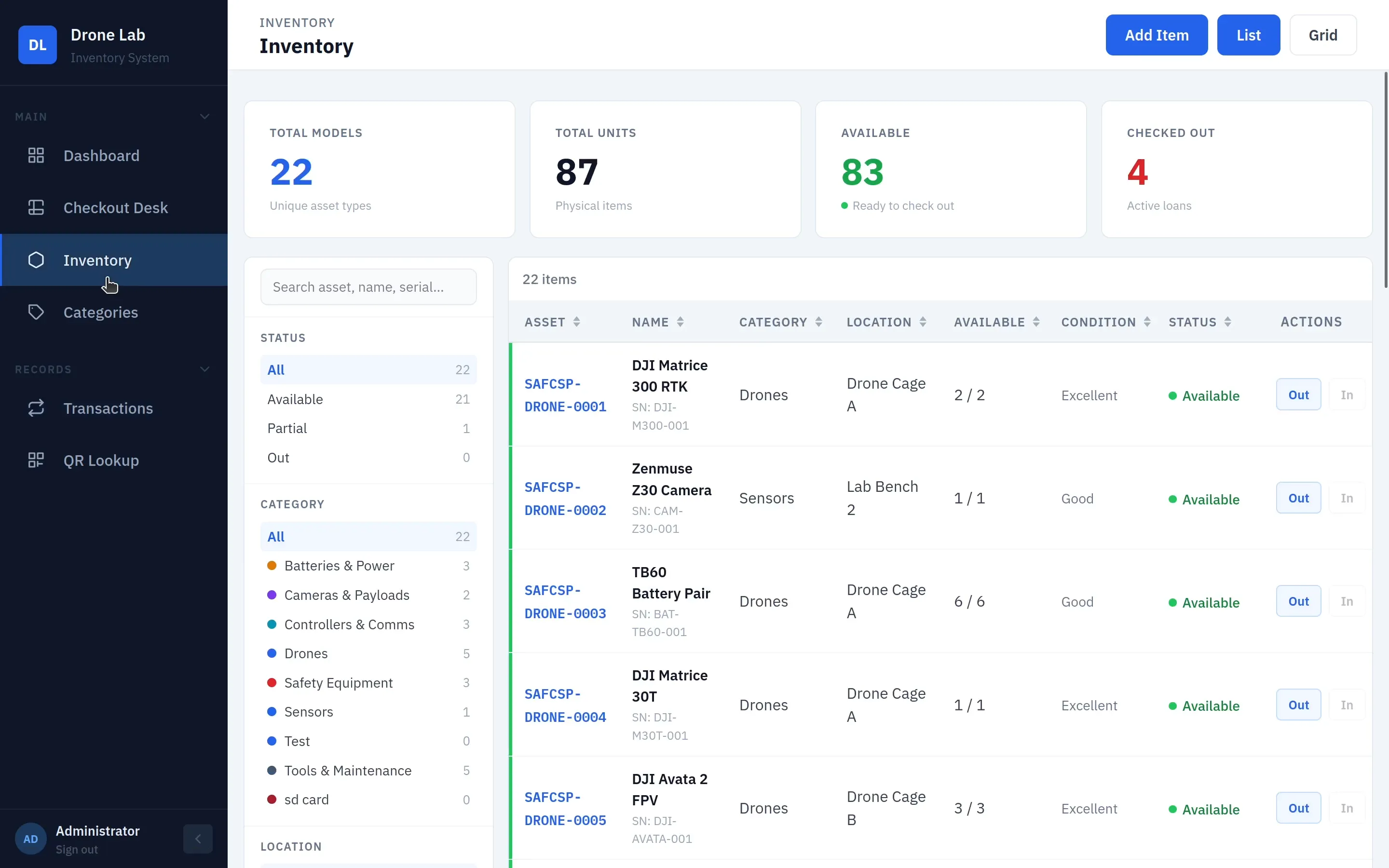
The drone lab holds high-value, safety-sensitive equipment — drones, cameras, sensors, LiPo batteries — spread across nine categories and multiple storage locations. Before this system, tracking it relied on memory and scattered notes: no reliable record of who took what, when it was due back, or how much was left on the shelf.
I built a QR-based platform to replace all of that. Every asset gets a permanent asset code and a QR sticker. A scan checks an item in or out in seconds; sensitive gear requires staff sign-off before it leaves; and every action is logged against a named user, a due date, and a signature.
It’s not a prototype. It’s loaded with the lab’s real inventory — 87 physical units across 22 asset types in 9 categories — and it’s been running in production since it shipped, on one dedicated lab PC with no cloud fees and no internet dependency.
The stack
bill of materials
| item | qty | notes |
|---|---|---|
| FastAPI backend | 1 | Auth, asset codes, checkout/return logic, approvals, audit log — all REST. |
| PostgreSQL + SQLAlchemy/Alembic | 1 | System of record for every item, unit, user, and transaction. |
| React 19 + Vite frontend | 1 | Dashboard, checkout desk, inventory, and admin views. |
| QR generation + camera/hardware scanning | per unit | qrcode/Pillow on the backend; zxing-js and jsqr in the browser. |
| Docker Compose + GHCR | 1 stack | Backend, frontend, and Postgres, built and published as images. |
| Watchtower | 1 | Polls GHCR every 5 minutes and redeploys the lab PC automatically. |
| Dedicated lab PC | 1 | Ubuntu + Avahi mDNS, reachable at inventory-server.local on the lab LAN. |
The interesting constraint was self-sufficiency: everything runs on one Linux PC on the lab Wi-Fi, with no installs on anyone else’s device. Students and staff just open a browser to inventory-server.local — Avahi mDNS makes the hostname resolve on the lab LAN without any DNS setup. Docker Compose runs Postgres, the FastAPI backend, and the React frontend as three services; Watchtower polls GHCR for new images every five minutes and redeploys automatically, so pushing to GitHub is the entire release process.
One screen, total visibility
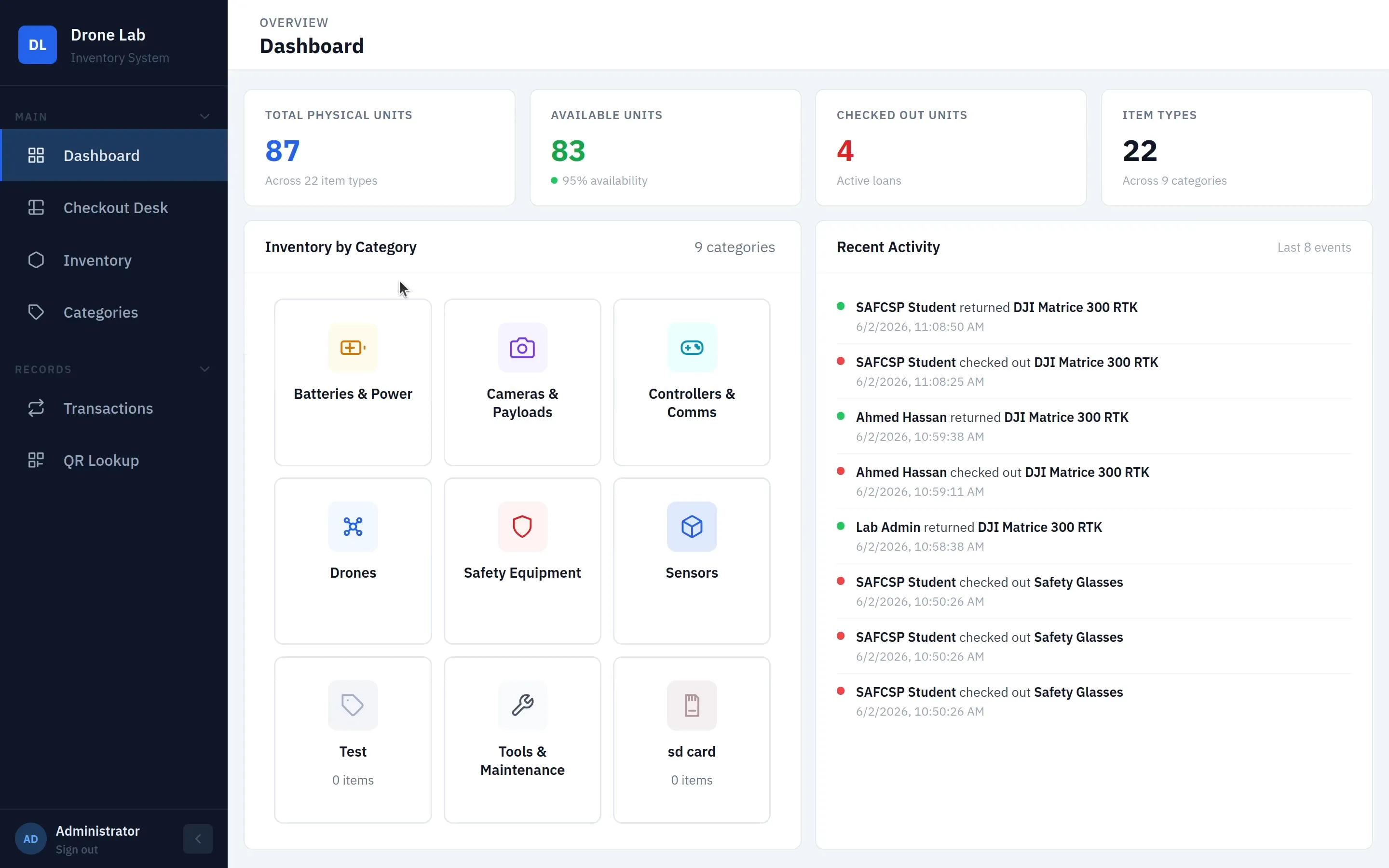
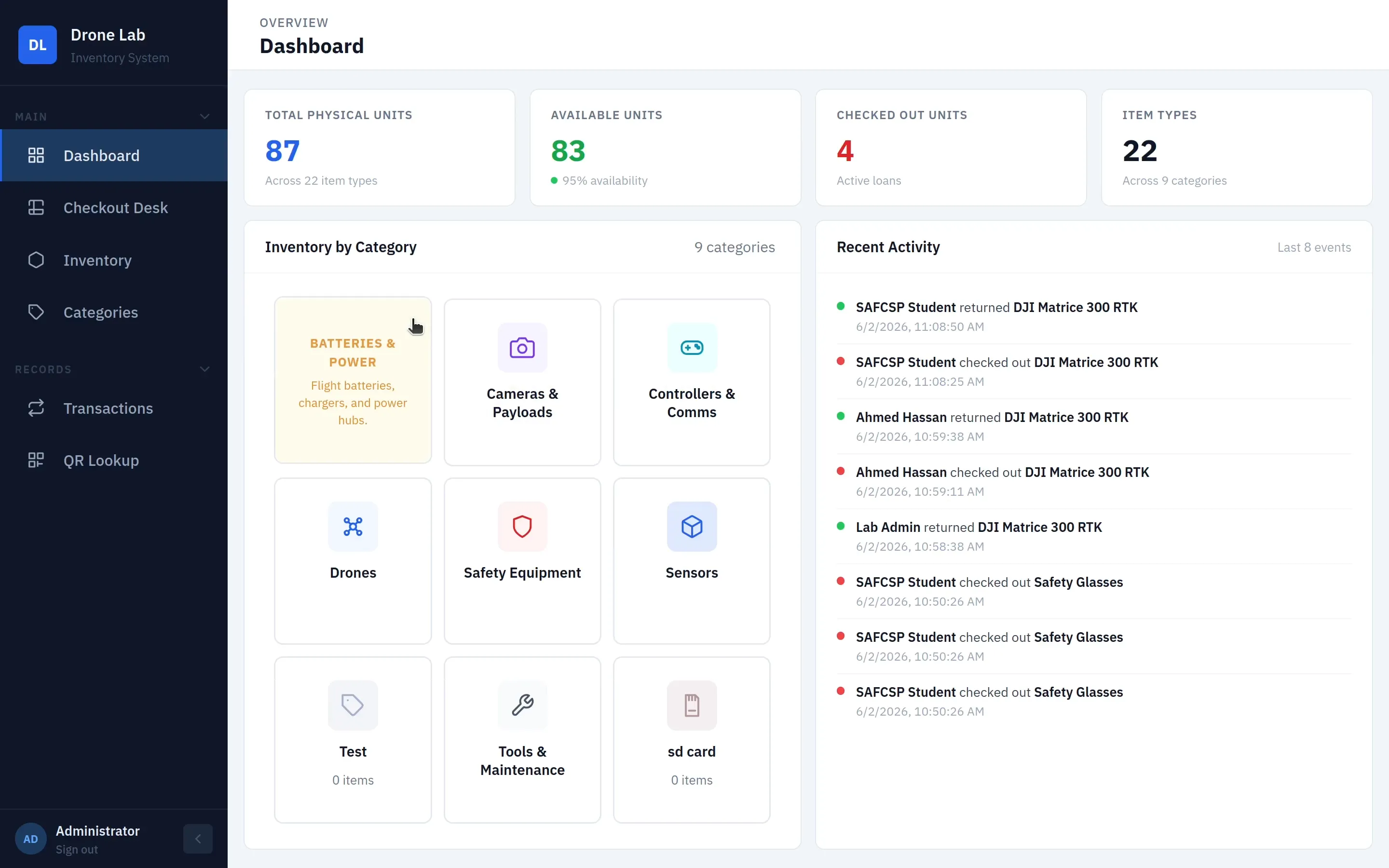
The dashboard turns “go check the shelf” into a glance: live counts, category breakdown, overdue loans, and pending approvals, all recalculated the instant anything is scanned.
Every unit, accounted for individually
Each item carries a permanent asset code in the format TQ-{CAT}-{XXXXXX} — a lab prefix, a 2–6 letter category code set by an admin, and a random hex suffix guaranteed unique. High-value gear (drones, cameras, controllers) is tracked as individual serialized units, each with its own QR sticker and transaction history; consumables like batteries and cables are tracked as a pooled quantity instead.
Scanning a unit’s QR code resolves straight to its detail page, but the lookup isn’t locked to the system’s own codes — an item can also be found by an external/IT barcode, a manufacturer part number, or a unit serial. That flexibility mattered the first week: half the existing gear already had someone else’s asset tag on it.
Check gear out in seconds
The checkout flow is built around scanning, not forms. Browse or search inventory, build a cart, and complete a checkout by scanning — a phone camera, a webcam, or a USB/Bluetooth hardware scanner all work interchangeably, with continuous multi-scan on any page.
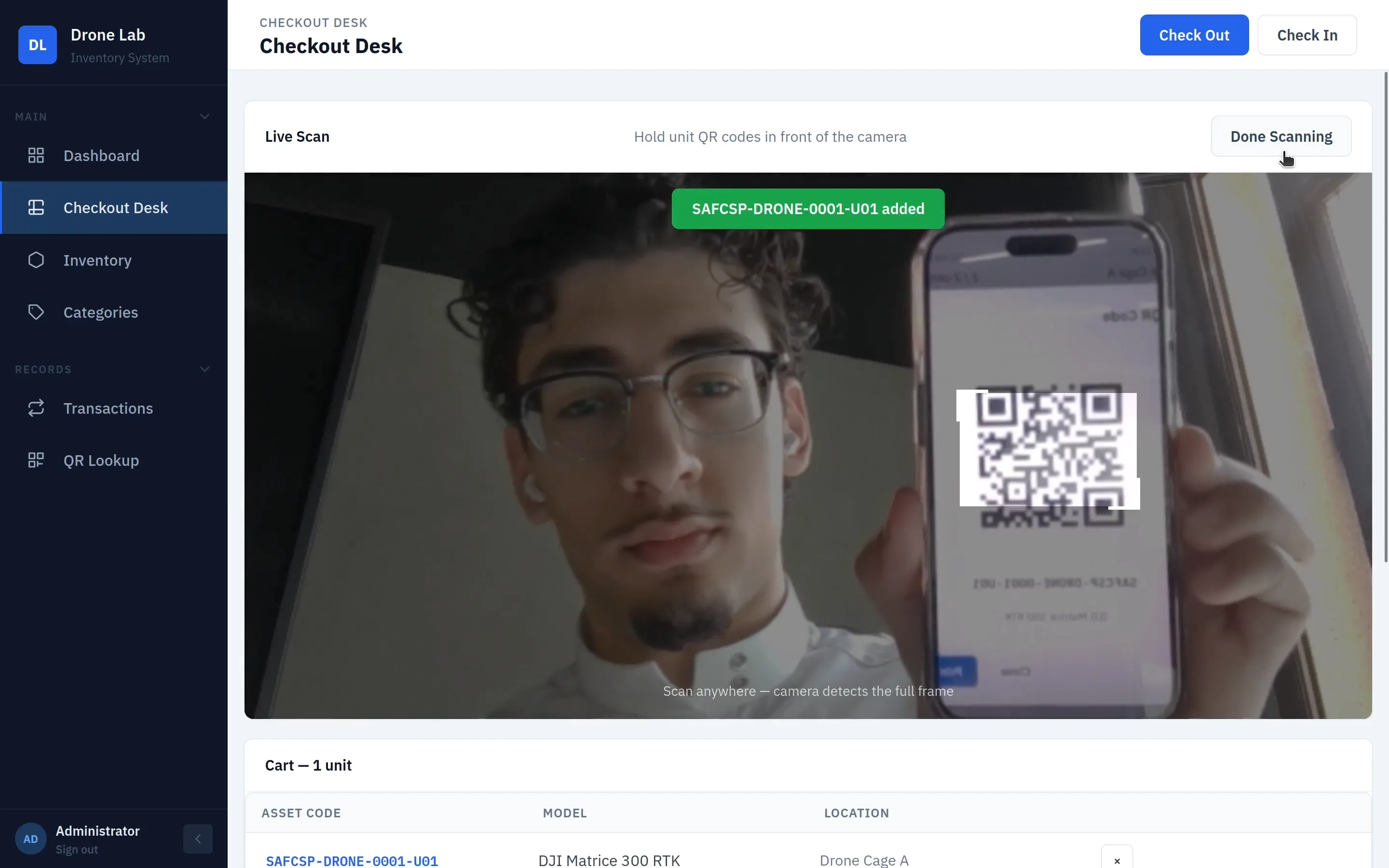
Once the cart is built, staff select the borrower, set a due date, add notes, and capture a digital signature on-screen before confirming.
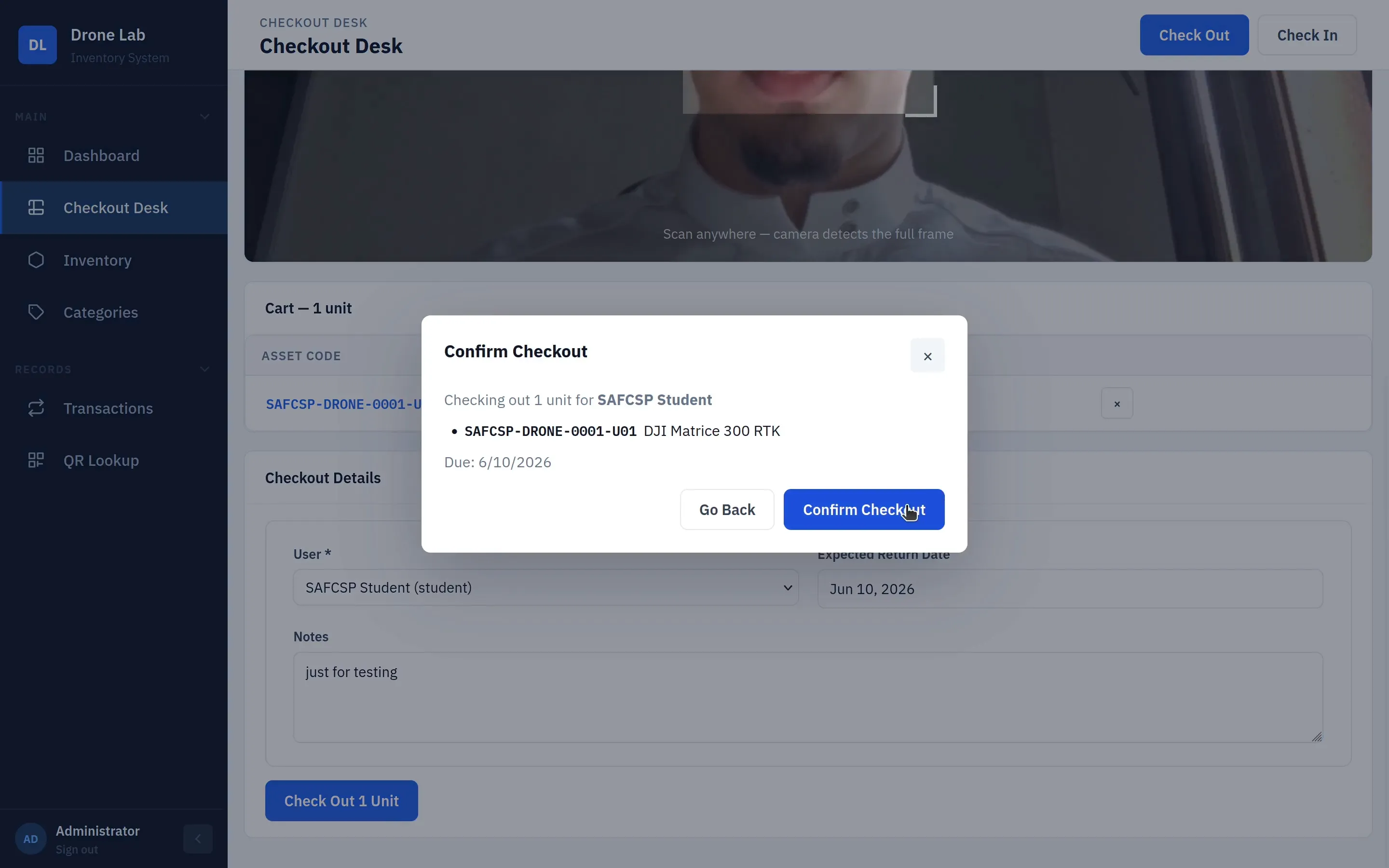
Checkout generates a downloadable PDF receipt with the signature and asset codes attached. Returns work the same way in reverse: scan or look up the unit, log its condition as Good / Needs Repair / Damaged, and availability restores automatically.
Sign-off and access, built in
Sensitive gear doesn’t move without approval. Admins can flag a category — Drones, for example — as “Requires Approval,” and nothing in it can leave without staff sign-off: the request lands in a dedicated approvals queue, the item is reserved for the borrower while staff review it, and they approve or deny from there.
Access itself is role-based:
| Role | What they can do |
|---|---|
| Student | Browse inventory, request checkouts, view their own loan history, update their profile. |
| Staff | Everything a student can, plus process check-ins, manage inventory and categories, approve requests, view all transactions. |
| Admin | Everything staff can, plus manage user accounts, locations, and the full audit log. |
A permanent record of every movement
Nothing leaves or returns without a trace. Every checkout and return is tied to a specific student, staff member, or admin, stamped with the exact time it happened, and searchable in a filterable transaction log — by borrower, item, or date, down to the minute. Every change to inventory records is logged and visible to admins in a full audit trail.
Set up once, runs itself
The system is engineered to keep running with no babysitting: no installs on any client device, no manual maintenance, and no lost data.
- Zero-install access — everyone else just opens a browser to
inventory-server.local. Nothing to install anywhere but the lab PC. - 24/7 LAN access — available on the lab network from any browser, any time, with no dependency on an internet connection.
- Self-updating deployment — pushing code to GitHub rebuilds the images and Watchtower redeploys the lab PC automatically, no on-site maintenance required.
- Automated backups — the database backs up daily and is retained for 14 days, with no manual step.
That reliability bar is what separates a demo from a system a lab can actually depend on: one that survives a reboot, updates itself, and never loses its records.
What it’s worth
The value isn’t the software — it’s what stops going wrong once it’s in place.
Before: stock levels lived in people’s heads and scattered notes, there was no record of who borrowed what or when it was due, anyone could walk off with high-value gear with no sign-off, and lost or overdue items went unnoticed for weeks.
After: live counts across all 87 units, always current; every loan tied to a named user, a due date, and a signature; sensitive categories require approval before anything leaves; overdue loans and pending approvals surface on the dashboard; and the whole thing runs on one lab PC with zero installs, daily backups, and self-updating deploys.
What I’d do differently
- Design the approval queue for scale from day one. It works well at the lab’s current volume, but the reservation logic while a request sits in review is the part I’d revisit first if checkout volume grew.
- Add condition photos earlier. Damage is currently a status field (Good / Needs Repair / Damaged) with a notes box — a required photo on anything marked damaged is next on the roadmap, and it should have shipped with the first version.
- Build the maintenance queue as part of the return flow, not after it. Right now a damaged return is just a flag; turning it into an open/resolved repair ticket automatically is planned next, and bolting it on after the fact means touching the return path twice.
Planned next: NFC tap-to-approve for staff, a per-drone flight log captured on return, required damage photos, an automatic maintenance queue, quarterly 9-point safety inspections, and a checkout receipt reformatted to match the lab’s official custody form.